今天考完了槪统,有了一点点空闲时间,不想复习离散,于是连上了我好久不上的yoga,然后想到之前给老张修apt的时候没修好,于是想研究一下包管理器,于是进入了/etc,找到了pacman有关的文件
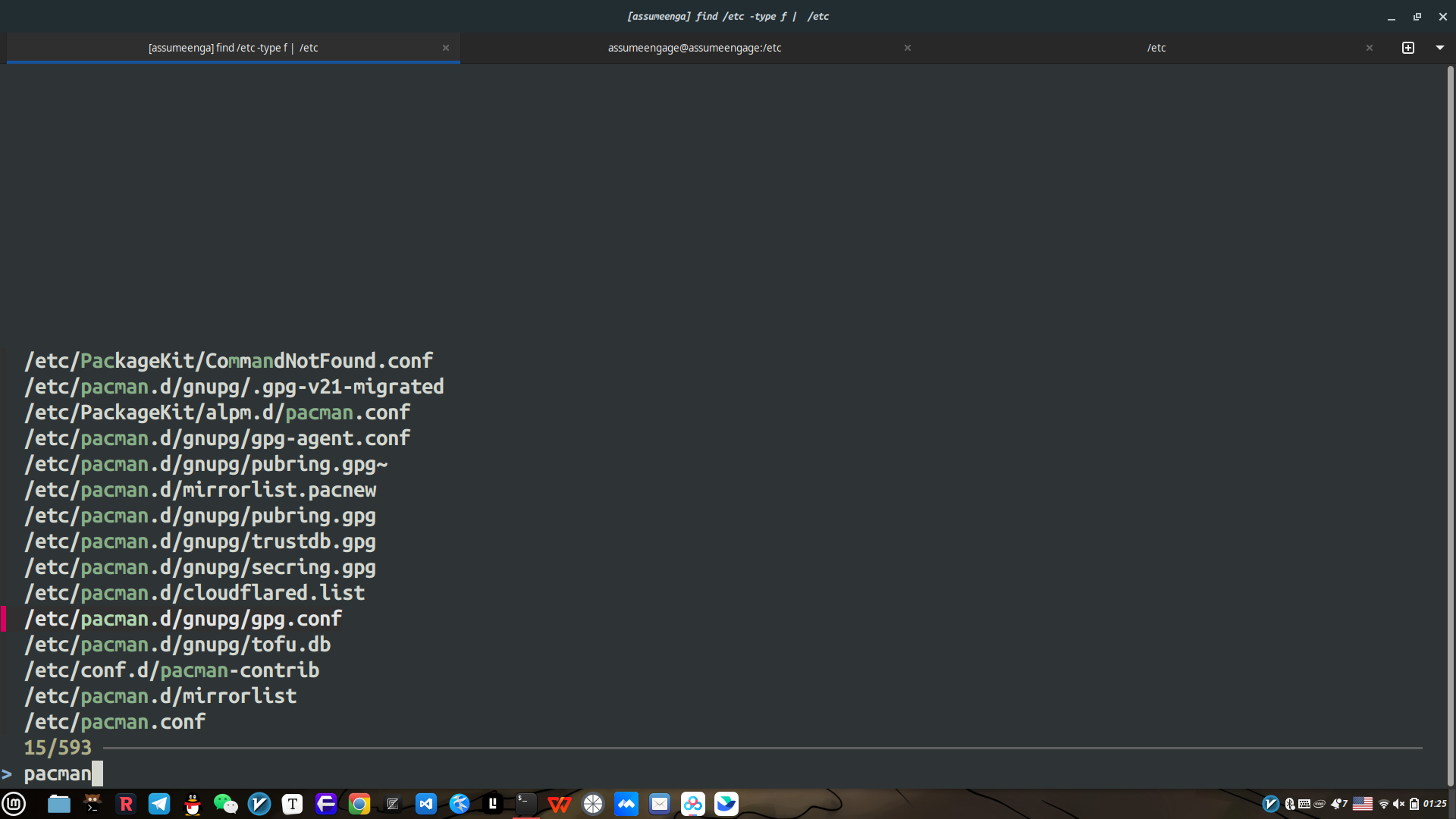
其实主要有这么几个部分:
核心管理
镜像管理
安全验证
通信抽象
下面我会逐层讲解这几个部分:
首先是核心管理层:我们现在使用的是.conf文件进行管理整个pacman,他其实有点像win的注册表或者是macos的plist,但是他是使用INI格式,比较human friendly.jpg
实际上呢是pacman去读取这个.conf文件,主要是Arch Linux Package Management (ALPM)进行作用
-
/etc/pacman.conf
pacman 的主配置文件。定义软件仓库地址、签名检查、颜色输出、保留缓存等全局行为。这是 pacman 最重要的配置文件。这个是我的conf
xsk@assumeengage /etc> cat pacman.conf
#
# /etc/pacman.conf
#
# See the pacman.conf(5) manpage for option and repository directives

#
# GENERAL OPTIONS
#
[options]
# The following paths are commented out with their default values listed.
# If you wish to use different paths, uncomment and update the paths.
#RootDir     = /
#DBPath      = /var/lib/pacman/
#CacheDir    = /var/cache/pacman/pkg/
#LogFile     = /var/log/pacman.log
#GPGDir      = /etc/pacman.d/gnupg/
#HookDir     = /etc/pacman.d/hooks/
HoldPkg     = pacman glibc
#XferCommand = /usr/bin/curl -L -C - -f -o %o %u
#XferCommand = /usr/bin/wget --passive-ftp -c -O %o %u
#CleanMethod = KeepInstalled
Architecture = auto

# Pacman won't upgrade packages listed in IgnorePkg and members of IgnoreGroup
#IgnorePkg   =
#IgnoreGroup =

#NoUpgrade   =
#NoExtract   =

# Misc options
#UseSyslog
Color
ILoveCandy
#NoProgressBar
CheckSpace
#VerbosePkgLists
ParallelDownloads = 5
DownloadUser = alpm
#DisableSandbox

# By default, pacman accepts packages signed by keys that its local keyring
# trusts (see pacman-key and its man page), as well as unsigned packages.
SigLevel    = Required DatabaseOptional
LocalFileSigLevel = Optional
#RemoteFileSigLevel = Required

# NOTE: You must run `pacman-key --init` before first using pacman; the local
# keyring can then be populated with the keys of all official Arch Linux
# packagers with `pacman-key --populate archlinux`.

#
# REPOSITORIES
#   - can be defined here or included from another file
#   - pacman will search repositories in the order defined here
#   - local/custom mirrors can be added here or in separate files
#   - repositories listed first will take precedence when packages
#     have identical names, regardless of version number
#   - URLs will have $repo replaced by the name of the current repo
#   - URLs will have $arch replaced by the name of the architecture
#
# Repository entries are of the format:
#       [repo-name]
#       Server = ServerName
#       Include = IncludePath
#
# The header [repo-name] is crucial - it must be present and
# uncommented to enable the repo.
#

# The testing repositories are disabled by default. To enable, uncomment the
# repo name header and Include lines. You can add preferred servers immediately
# after the header, and they will be used before the default mirrors.

#[core-testing]
#Include = /etc/pacman.d/mirrorlist

[core]
Include = /etc/pacman.d/mirrorlist

#[extra-testing]
#Include = /etc/pacman.d/mirrorlist

[extra]
Include = /etc/pacman.d/mirrorlist

# If you want to run 32 bit applications on your x86_64 system,
# enable the multilib repositories as required here.

#[multilib-testing]
#Include = /etc/pacman.d/mirrorlist

[multilib]
Include = /etc/pacman.d/mirrorlist

# An example of a custom package repository.  See the pacman manpage for
# tips on creating your own repositories.
#[custom]
#SigLevel = Optional TrustAll
#Server = file:///home/custompkgs
[archlinuxcn]
Server = https://mirrors.tuna.tsinghua.edu.cn/archlinuxcn/$arch
Server = https://mirrors.ustc.edu.cn/archlinuxcn/$arch
Server = https://mirrors.hit.edu.cn/archlinuxcn/$arch
| 功能 | pacman(二进制) | ALPM(libalpm.so) | 其他层 |
|---|---|---|---|
读取 /etc/pacman.conf |
 pacman 负责 pacman 负责 |
✘ | |
| 解析依赖关系 | ✘ | ALPM |
|
| 下载包 | 部分(负责调度) | 调用 curl |
libcurl 实际下载 |
| 验证 GPG 签名 | ✘ | ALPM |
GnuPG 库执行真正验证 |
| 与图形界面通信 | ✘ | ✘ | DBus + polkit |
然后是镜像管理,也就是pacman.d/mirrorlist下面的源,如果读到第一个能用的源,他就会使用这个,也就是说故障转移 + 就近访问
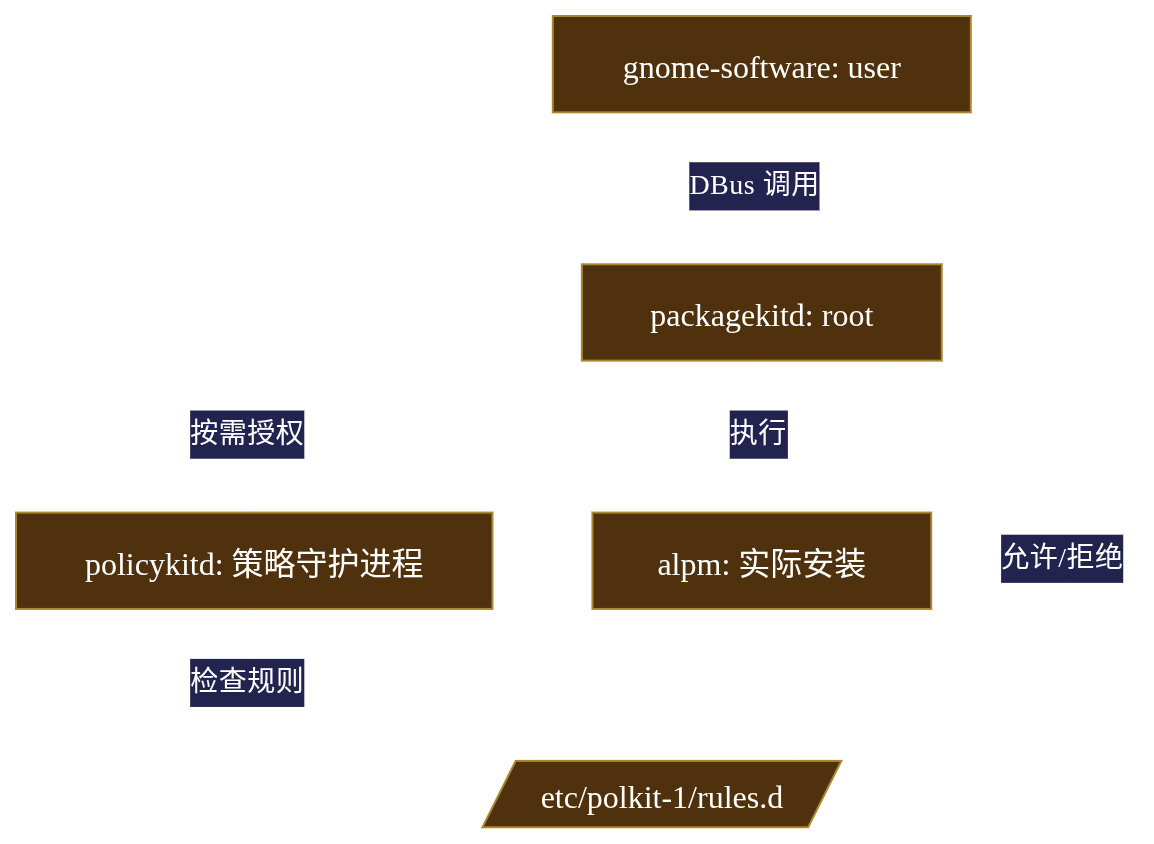
好吧,实际上这个不是源,是CDN的节点,这麽说吧,pacman实际上是支持HTTP1.1的Last-Modified的缓冲头的,也就是说实际上他是能够配合CDN使用的
软件源这边实际上真实的排序算法比较复杂,没有刚才讲的那没简单,实际上,func reflector()这个函数评分决定,reflector的评分并非简单 ping,而是多维度加权。
Talk is cheap show me the code →
import requests, time, statistics

def score_mirror(url: str) -> float:
    # 1. 延迟测试(TCP 握手,非 ICMP,更真实)
    latencies = []
    for _ in range(3):
        start = time.perf_counter()
        try:
            requests.head(url + "/lastsync", timeout=2)
            latencies.append((time.perf_counter() - start) * 1000)  # ms
        except:
            return float('inf')  # 不可达,分数无穷大

    latency = statistics.median(latencies)  # 中位数抗抖动

    # 2. 带宽测试(下载 1MB 大小文件)
    start = time.perf_counter()
    r = requests.get(url + "/core/os/x86_64/core.db", timeout=5)
    download_time = time.perf_counter() - start
    bandwidth = len(r.content) / download_time / 1024  # KB/s

    # 3. 同步状态(lastsync 文件时间)
    lastsync = requests.get(url + "/lastsync").text.strip()
    server_time = int(lastsync)  # Unix 时间戳
    time_diff = abs(time.time() - server_time)  # 与本地时间差

    # 4. 综合评分(加权公式)
    score = latency * 0.4 + (1 / bandwidth) * 0.3 + time_diff * 0.3
    return score
然后是只要去向上游拉取,就避免不了经典且伟大的base/ours/theirs设计哲学
假设场景:
- Day 0:你修改
/etc/pacman.conf,注释掉[multilib]仓库(因为 32 位库不需要)。 - Day 30: pacman 更新,上游新增
[extra-testing]仓库配置。 - 问题:如果 pacman 直接覆盖你的
pacman.conf,你的修改丢失;如果不覆盖,你得不到新功能。
这就是配置漂移:本地状态偏离上游预期,导致升级冲突或功能缺失。
Git 合并代码时用到的 base/ours/theirs,pacman 借用了同样思想:
| 版本 | 内容 | 用途 |
|---|---|---|
| BASE | /etc/pacman.conf (原始发行版) |
合并基准 |
| LOCAL | /etc/pacman.conf (你的修改) |
保留用户配置 |
| REMOTE | /etc/pacman.conf.pacnew (新版本) |
获取新功能 |
合并逻辑:
- 无冲突:若 LOCAL 和 REMOTE 修改的是不同段落(你改
[options],上游改[core]),pacman 自动合并。 - 冲突:若修改同一行(如
SigLevel),pacman 无法决定,生成.pacnew,人工介入。
下面,你将会见到世界上最纯粹的炫压抑doge
好吧,实际上只是我要讲一下这个签名与验证机制,也就是GnuPG库真正发挥作用的层:
pacman 所有的签名验证都基于:
/etc/pacman.d/gnupg/
里面有:
pubring.gpg(公钥)
trustdb.gpg(信任数据库)
gpg.conf(gpg 配置)
实际上这个就是说,arch Linux官方使用他们自己的私钥给软件包签名,然后我们说,只有对应私钥的公钥才能进行验证,而我们当初安装archLinux时候,公钥已经提前被放置在pubring.gpg里面了,可以用pgpdump逆向一下,其实还挺好玩的,这个是放在/etc/目录下,不会放在~/下面,要记住,其实Unix设计哲学就是权限隔离:你不能假设你的用户是安全的,也就是说,如果放在~/下面,如果用户更改加入恶意公钥,然后root去读,是不是就会破坏root环境,这个就很逆天,就是pacman 的安全性就不再是“系统级”,而是被用户左右。
验证 .pkg.tar.zst 的包签名,还有下面这些软件仓库目录索引的压缩包,不再详细解释,因为我懒(双手插腰.jpg)
core.db
extra.db
community.db
当然了后面还有很多:包内容校验(SHA256)、文件列表(.PKGINFO)、数据库一致性验证 巴拉巴拉
下面是Dbus RPC通信
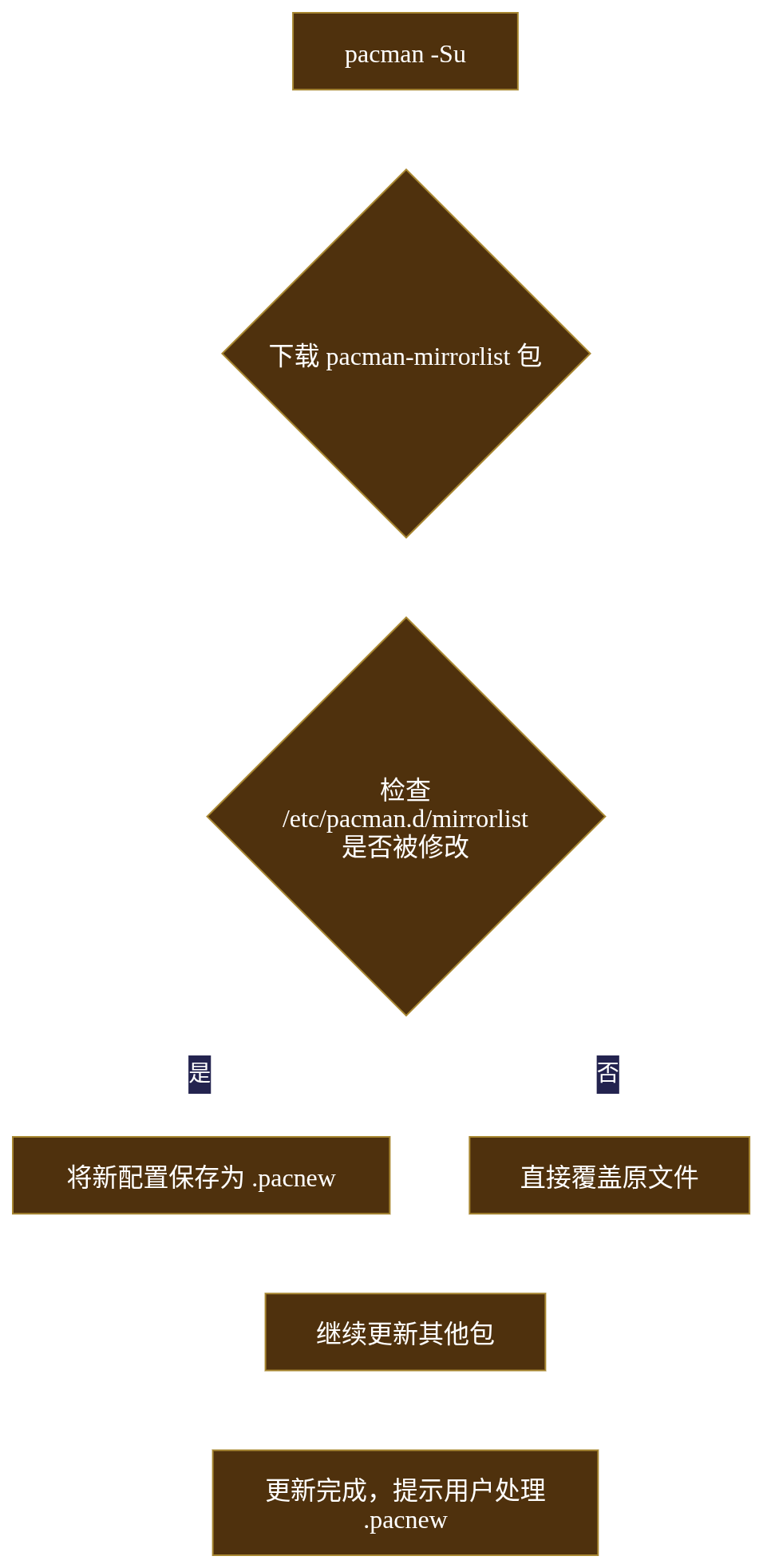
为了避免锁以及 root 权限越权,所以使用通信层只把有必要的信息暴露出来.
这段我不是特别了解这个具体是怎么实现的通讯,于是我稍微扒了一下源码,才明白这个到底是怎么回事:
实际上只有packageKit在获取root权限,但是,PackageKit 不直接调用 system("pacman -S"),那样太粗暴。它通过 ALPM 后端 将 DBus 调用转为 ALPM API,而DBus 不是简单的消息队列,而是带类型检查和对象模型的 RPC。
下面我让ai帮我对比了一下pacman和其他的包管理器:
一、核心配置层对比
| 特性 | Arch pacman | Debian apt | RHEL dnf | openSUSE zypper |
|---|---|---|---|---|
| 配置语法 | INI 风格[section]key = value |
INI + 多行值Acquire::http::Proxy |
INI + 变量$basearch 展开 |
INI 风格[main] 段 |
| 仓库定义 | 独立 mirrorlistURL 模板 $repo |
sources.list 内嵌 URL或 sources.list.d/ |
.repo 文件baseurl= |
.repo 文件baseurl= |
| 动态变量 | $repo, $arch |
{distro_codename} |
$releasever, $basearch |
$releasever |
| 配置原子性 | .pacnew 三向合并 |
dpkg-old 备份无冲突检测 |
.rpmnew/.rpmsave简单备份 |
.rpmnew 机制 |
| 架构体现 | 策略模式 代码与配置分离 |
管道模式apt → dpkg |
插件模式 libdnf + 插件 |
服务化 依赖 SAT 求解器 |
设计哲学差异
pacman (KISS 原则):
# 配置即文本,一行一个镜像
Server = https://mirror.archlinux.org/$repo/os/$arch
- 极简:无变量替换、无复杂逻辑
- 显式:用户必须手动编辑,无魔法
apt (稳定压倒一切):
# 支持变量、条件判断、多协议
deb [arch=amd64 signed-by=/usr/share/keyrings/foo.gpg] \
    https://deb.debian.org/debian bookworm main
- 灵活:支持多架构、指定密钥
- 复杂度高:
apt.conf.d/有 50+ 配置片段
dnf (企业级特性):
# /etc/yum.repos.d/fedora.repo
[base]
name=Fedora $releasever - $basearch
metalink=https://mirrors.fedoraproject.org/metalink?repo=fedora-$releasever&arch=$basearch
enabled=1
metadata_expire=7d
- 模块化:
.repo文件可插件化启用 - 自动变量:
$releasever自动解析为39
二、镜像管理层对比
镜像选择算法
| 管理器 | 算法 | 工具 | 核心指标 |
|---|---|---|---|
| pacman | 贪心 + 静态顺序 第一个可用即停止 |
reflector (Python) |
延迟、带宽、同步状态 |
| apt | 择优 + 并发测速apt-spy2 |
netselect-apt |
延迟、丢包率 |
| dnf | Metalink + 动态选择 内置 fastestmirror 插件 |
dnf config-manager |
镜像列表优先级 |
| zypper | 静态权重 手动指定优先级 |
zypper mr -p 90 |
人为设定权重 |
pacman 的朴素 vs dnf 的智能:
# pacman 的镜像选择(C 语言简化)
for server in mirrorlist.servers:
    if is_reachable(server):
        return server  # 第一个可用就停止
# 时间复杂度 O(n),无并发
# dnf 的 fastestmirror(Python 伪代码)
mirrors = fetch_metalink()  # 从 metalink 获取 200+ 镜像
results = asyncio.gather(*[ping(m) for m in mirrors])  # 并发测速
return min(results, key=lambda x: x.latency)
# 时间复杂度 O(1)(并发),但首次启动慢
CDN 集成能力
pacman:支持 HTTP 基础缓存头,但无 ETag,对 CDN 友好度中等
apt:支持 Acquire::http::Pipeline-Depth,配合 CDN 效率高
dnf:metalink 自动选择最优镜像,原生 CDN 感知
zypper:支持 download.opensuse.org 的智能重定向
三、安全验证层对比
信任模型
| 管理器 | 信任根 | 密钥管理 | TOFU | 吊销机制 |
|---|---|---|---|---|
| pacman | Master Key 离线保管 |
/etc/pacman.d/gnupg/ |
 内置 内置 |
pacman-key --refresh |
| apt | Debian Archive Keydebian-keyring 包 |
/etc/apt/trusted.gpg.d/ |
 无 无 |
apt-key adv --refresh |
| dnf | Fedora CAfedora-repos 包 |
/etc/pki/rpm-gpg/ |
无 |
自动更新 gpgkey= URL |
| zypper | openSUSE 密钥环openSUSE-release |
/usr/lib/sysimage/rpm/ |
无 |
zypper ref --gpg-auto-import-keys |
签名验证机制
pacman 的 PGP-Only 模型:
# 签名文件与包分离
pacman-6.0.2-7-x86_64.pkg.tar.zst
pacman-6.0.2-7-x86_64.pkg.tar.zst.sig  # ← 独立的 .sig 文件

# 验证流程
gpg --verify package.pkg.tar.zst.sig package.pkg.tar.zst
apt 的 GPG + InRelease 模型:
# 签名嵌入在 InRelease 文件
InRelease  # 包含 Release 文件 + GPG 签名
Packages.xz  # 包索引
Packages.xz.asc  # 索引的 ASCII 签名

# 验证流程
gpg --verify InRelease
# 再校验 Packages.xz 的哈希值是否在 InRelease 中
dnf 的 RPM-GPG 模型:
# 每个 RPM 包内部嵌入签名
rpm -qi vim-9.0.2.rpm
# 输出: Signature: RSA/SHA256, 2023-11-01, Key ID 15a5b4e9

# 验证流程
rpm -K vim-9.0.2.rpm  # 调用 librpm 验证
签名强度对比:
- pacman:
**强**,签名覆盖源码 → 二进制全程,PKGBUILD 可审计 - apt:
**中**,只验证索引,不验证每个 .deb 包(除非启用debsig-verify) - dnf:
**弱**,RPM 签名可被剥离,且不验证构建过程
四、通信抽象层对比
图形界面集成
| 管理器 | 架构 | 权限分离 | DBus 接口 | 策略引擎 |
|---|---|---|---|---|
| pacman | PackageKit + ALPM | 完美分离 |
org.freedesktop.PackageKit |
PolicyKit (JS 规则) |
| apt | PackageKit + APT | 分离 |
同上 | PolicyKit |
| dnf | PackageKit + DNF | 分离 |
同上 | PolicyKit |
| zypper | Polkit 直接调用 |  部分分离 部分分离 |
无原生 DBus | Polkit (PAM 集成) |
命令行 vs 库的哲学
pacman:前端与库分离
// pacman 命令 → libalpm.so
pacman -S neovim
// 等价于调用:
alpm_db_get_pkg(db, "neovim");
alpm_trans_add_pkg(handle, pkg);
alpm_trans_commit(handle);
apt:管道模式
# apt 只是 dpkg 的前端
apt download neovim  # 下载
dpkg -i neovim.deb    # 安装(另一个程序)
# 两者无共享内存,通过文件传递数据
dnf:Python 绑定
# dnf 是 Python 脚本,直接 import libdnf
import dnf
base = dnf.Base()
base.fill_sack()
base.install("neovim")
base.resolve()
base.do_transaction()
架构优劣:
- pacman:C 语言高效,但 API 不够动态
- apt:松耦合,但性能损耗在进程间通信
- dnf:Python 易扩展,但启动慢(导入大量模块)
五、依赖解析算法对比
版本约束求解
| 管理器 | 算法 | 时间复杂度 | 循环依赖处理 | 降级支持 |
|---|---|---|---|---|
| pacman | 图遍历 + 拓扑排序 | O(V+E) | 拒绝安装 | 完美降级 |
| apt | SAT 求解器 (libsolv) | O(2^n) 最坏 | 复杂但可解 | 部分支持 |
| dnf | libsolv (SAT) | O(n log n) 平均 | 最优解 | 支持 |
| zypper | libsolv (SAT) | O(n log n) | 最优解 | 支持 |
pacman 的朴素 vs libsolv 的智能:
// pacman 的依赖解析(深度优先搜索)
int resolve_deps(alpm_pkg_t *pkg) {
    for (dep in pkg->depends) {
        if (!find_local(dep)) {
            alpm_pkg_t *provider = find_repo(dep);
            if (!provider) return -1;  // 直接失败
            resolve_deps(provider);   // 递归
        }
    }
}
// 优点: 简单、可预测
// 缺点: 可能错过更优解
// libsolv 的 SAT 求解(dnf/zypper)
Pool *pool = pool_create();
Repo *repo = repo_create(pool, "base");
repo_add_rpm(repo, rpm_file);
Solver *solver = solver_create(pool);
solver_solve(solver, jobs);  // 转化为布尔可满足性问题
// 优点: 能找到全局最优解
// 缺点: 黑盒、调试困难
六、独特创新对比
Nix/NixOS (函数式包管理)
根本不同:不可变存储 + 函数式构建
# Nix 表达式是纯函数
neovim = stdenv.mkDerivation {
  name = "neovim-0.9.5";
  src = fetchurl {
    url = "https://github.com/neovim/neovim/archive/v0.9.5.tar.gz";
    sha256 = "1a2b3c4d...";
  };
  buildInputs = [ cmake lua ];
}
- 无
/usr/bin:所有包在/nix/store/哈希值-包名 - 原子升级:切换是修改
/run/current-system的符号链接 - 依赖地狱终结:同一个库的不同版本共存
Guix (GNU 的 Nix)
类似 Nix,但用 Scheme 语言:
;; Guix 包定义
(define-public neovim
  (package
    (name "neovim")
    (version "0.9.5")
    (source (origin
              (method url-fetch)
              (uri (string-append "https://..." version ".tar.gz"))
              (sha256 (base32 "1a2b3c4d..."))))
    (build-system cmake-build-system)
    (inputs `(("lua" ,lua)))))
七、总结:设计哲学与适用场景
pacman (Arch)
- 哲学:KISS (Keep It Simple, Stupid)
- 适用:滚动发行版、开发者、高级用户
- 优势:透明、可预测、极致简洁
- 劣势:依赖解析弱、无回滚快照
apt (Debian/Ubuntu)
- 哲学:稳定压倒一切
- 适用:服务器、企业环境、桌面用户
- 优势:生态庞大、企业支持、稳定
- 劣势:配置复杂、PPA 污染
dnf (Fedora/RHEL)
- 哲学:企业级 + 创新
- 适用:企业服务器、开发者工作站
- 优势:模块化、强依赖解析、模块流
- 劣势:臃肿、Python 栈慢
zypper (openSUSE)
- 哲学:精确 + 快照
- 适用:桌面、服务器、需要回滚的场景
- 优势:Btrfs 快照集成、SAT 求解强
- 劣势:社区小、包数量少
这上面ai写的部分只需要看一下这个apt就行,其他的写的有点多余:(
最后放一下arch wiki狗头保命doge pacman - ArchWiki
2025.11.16 5:50